channel
type hchan struct {
    qcount   uint           // 当前队列中已有的元素个数(即 channel 中待接收的数据量)
    dataqsiz uint           // 环形缓冲区的容量(即 make(chan T, N) 中的 N)
    buf      unsafe.Pointer // 指向底层环形缓冲区数组的指针
    elemsize uint16         // 单个元素的大小(字节)
    closed   uint32         // 通道是否已关闭的标志(0:未关闭, 1:已关闭)
    elemtype *_type         // 元素的类型信息(用于反射和类型检查)
    sendx    uint           // 发送索引:下一个数据要写入缓冲区的位置
    recvx    uint           // 接收索引:下一个数据要从缓冲区读取的位置
    recvq    waitq          // 等待接收数据的 goroutine 队列(链表)
    sendq    waitq          // 等待发送数据的 goroutine 队列(链表)

    lock mutex              // 互斥锁:保护上述所有字段,保证并发安全
}
无缓冲 Channel 是实现 Goroutine 之间强同步的最佳方式,它确保了数据发送和接收操作同时发生。代码示例
context.WithTimeout就是计时器结合无缓冲channel实现的
有缓冲 Channel 在发送和接受操作时是非阻塞的,除非缓冲已满(发送操作阻塞)或缓冲空了(接受操作阻塞)。
重复close channel会发生panic
panic: close of closed channel
往未初始化的channel(nil)中发送数据,会发生error
fatal error: all goroutines are asleep - deadlock!
select就是多路复用监听channels的作用,如果所有 channel 都关闭了且没有数据了,select 会立即选中 default(如果有) 代码示例
1. Core Concept
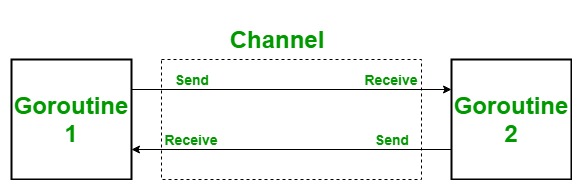
Channels are the pipes that connect concurrent goroutines. A channel is a technique which allows to let one goroutine to send data to another goroutine.
func main() {

    messages := make(chan string)
    // producer goroutine
    go func() { messages <- "ping" }()
    // consumer goroutine | main goroutine
    msg := <-messages
    fmt.Println(msg)
}
$ go run channels.go
ping
Think of goroutines as the "workers" and channels as the "communication lines" that allow these workers to coordinate and exchange information effectively.
By default sends and receives block until both the sender and receiver are ready. This property allowed us to wait at the end of our program for the "ping" message without having to use any other synchronization.
2. Unbuffered vs. Buffered Channel
Unbuffered channels are created without specifying a buffer size, like in above example. The key feature of unbuffered channels is their synchronous. Buffered channels are created by specifying a buffer size. The key feature of buffered channels is their asynchronous nature: sending and receiving operations are not blocking until the buffer is full or empty.
Let's look at an example of a buffered channel:
func main() {
    // create a buffered channel with capacity 2
    ch := make(chan int, 2)

    // start timing to calculate the time elapsed
    start := time.Now()

    go sender(ch, start)
    go receiver(ch, start)

    // delay for two goroutines to complete
    time.Sleep(6 * time.Second)
}

func sender(ch chan<- int, start time.Time) {
    for i := 1; i <= 3; i++ {
        fmt.Printf("Sending %d at %s\n", i, time.Since(start))
        ch <- i
        fmt.Printf("Sent %d at %s\n", i, time.Since(start))
    }
}

func receiver(ch <-chan int, start time.Time) {
    // delay start to demonstrate buffer filling up
    time.Sleep(2 * time.Second)

    for i := 1; i <= 3; i++ {
        val := <-ch
        fmt.Printf("Received %d at %s\n", val, time.Since(start))

        // sleep to simulate slow receiver
        time.Sleep(1000 * time.Millisecond)
    }
}

/*
Output:
Sending 1 at 0s
Sent 1 at 0s
Sending 2 at 0s
Sent 2 at 0s
Sending 3 at 0s
Received 1 at 2.0000571s
Sent 3 at 2.0000571s
Received 2 at 3.0003522s
Received 3 at 4.000808s
*/
As we can see from the output, the first two values are sent without blocking. However, when it comes to value 3, the sender has to wait util the receiver makes some space in the buffer by receieving value 1. After that, the sender can send value 3 to the channel.
Buffered channels are created by specifying a buffer size. The key feature of buffered channels is their asynchronous nature: sending and receiving operations are not blocking until the buffer is full or empty.
3. Direction Channel
Directional channels are channels that are restricted to either sending or receiving operations. Go allows us to specify the direction of a channel, making it either send-only or receive-only. This feature enhances type safety and clarifies the intended use of a channel within a function.
We can specify the direction of a channel using the following syntax:
- chan<- for a send-only channel
- <-chan for a receive-only channel
In the sender function, ch chan<- int indicates that ch is a send-only channel. Similarly, in the receiver function, ch <-chan int specifies that ch is a receive-only channel.
Specifying the direction of a channel is crucial for maintaining type safety in your Go programs. When you design a function to only send data, you can pass a send-only channel to that function. This prevents accidental attempts to receive data from the channel within the function, which would be a compile-time error.
By using directional channels, you make your code's intentions clearer and reduce the likelihood of errors related to channel operations.
4. Close Channel
In Go, we can close a channel using the close function. The primary purpose of closing a channel is to notify receivers that no more data will be sent, allowing them to stop waiting for additional data.
func main() {
    ch := make(chan int)
    close(ch)

    fmt.Println("Attempting to send to a closed channel...")
    ch <- 1
}

/*
Output:
Attempting to send to a closed channel...
panic: send on closed channel
*/
For receivers, reading from a closed channel immediately returns the zero value of the channel's type without blocking.
func main() {
    ch := make(chan int)

    close(ch)

    fmt.Println("Reading from a closed channel:")
    value, ok := <-ch
    fmt.Printf("Value: %v, Channel open: %v\n", value, ok)
}

/*
Output:
Reading from a closed channel:
Value: 0, Channel open: false
*/
This design could be considered a signal pattern. For example, signal that the goroutine has stopped working or that no more data will be sent.